Thursday, September 21, 2006

Perspective transformations

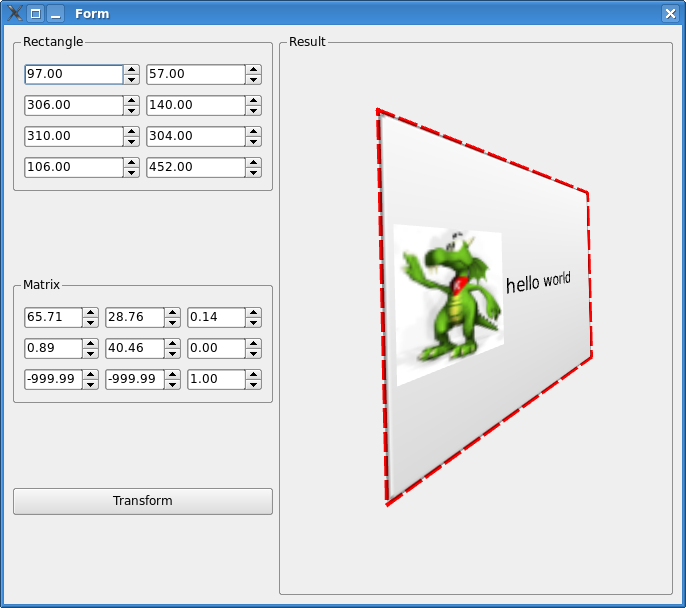
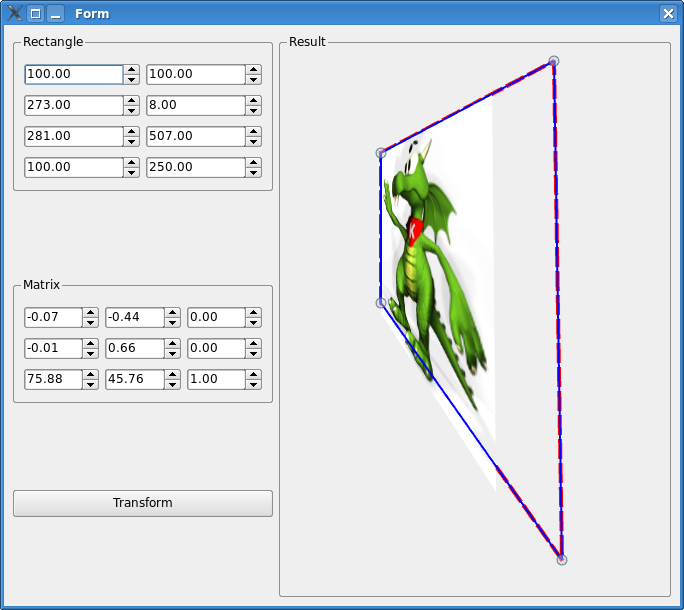
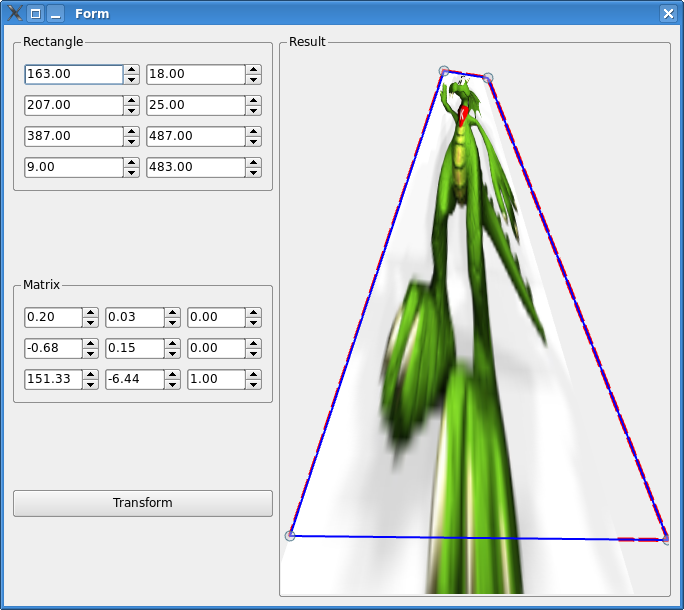
A really neat feature that Arthur in Qt4 was lacking was support for perspective transformations. QMatrix is an affine transformation class. Even though our docs advertise it as a 3x3 matrix it's actually 2x3. I've been wanting to do perspective transformations in Qt for a while. With Qt 4.2 frozen I had a chance to sit down and work in the main branch for the last two days. As a result I have a very basic support for perspective transformations in Qt. I added a QTransform class which is a true 3x3 matrix and gutted most of Qt where I replaced QMatrix with QTransform. Now it's possible to do projections of any kind of Qt element. That includes images like Konqy here:


but also all other Qt elements, like here a button with a label and icon:

All of which allows one to create a really nice looking 3D like looking effects in all Qt apps.

Tuesday, August 15, 2006

Glucose and graphics

Today I pushed a new acceleration architecture for Xorg. Called Glucose, it uses OpenGL to accelerate X. What happens there is that Glucose hooks into the initialisation code during the graphics card setup and dispatches the X rendering calls through the same codepaths that XGL uses. The email describing it and the some reasons for it is here: http://lists.freedesktop.org/archives/xorg/2006-August/017527.html. One step closer to the Open Source graphical utopia.

Besides that I've spent the last few days working on optimising various parts of Qt's rendering architecture. From OpenGL painter, through X11 to the raster code. Just beating down graphics into submission at this point really. At first a few code paths held me in a headlock that required some repetitive "banging head on the keyboard" action on my part but now it's ok. Now, Qt just rocks at rendering vector graphics. No screenshots today though :) I started writing a real-time vector graphics cartoon fully in Qt but it's not yet finished. By the way one thing I find missing in all Open Source vector editors is that you can't just scan your sketches and put them as background to trace over, Flash does it pretty ok. Instead of complaining I probably should just go ahead and implement it in Inkscape.

Finally Paul and I sat down today to figure out semantics of OpenGL support in Qtopia Core and we got it down. I'd like to have a fair dosage of 3D support on the Greenphone.

Oh, and US Airways stole my luggage. If you ever met me you know I have (had) a great collection of shirts. Now they belong to US Airways. Oh, and my US cell was in it, so if you've been wondering why I haven't been picking up your calls lately, it's because US Airways stole my phone.

Tuesday, August 08, 2006

Magic

So lets say you're writing an application. It's a pretty good looking application too. Lets say your gui is completely vector based. It's so nice because an artist designed it! But there's a problem, a large portion of your users doesn't really like the artist's style. Furthermore accessibility wise your application is a nightmare. To add insult to injury your application doesn't match at all the color scheme of any desktop environment. What do you do?

Crying is certainly an option. One used extensively by a lot of ISV as well (with limited success). What would be really cool is if you could have an external stylesheets that the desktop environment can affect, that your users can style with accessibility features, color schemes and basically whatever people want. So one would need a highly extensive support for external CSS stylesheets in SVG. One that goes a little beyond what SVG standard offers because SVG doesn't allow styling of things like "transform" element which would be very useful for number of things.

At this point it's probably very clear that is exactly what I did today.

QtSvg in 4.2 will have full support for external CSS stylesheets. That support includes all svg properties and attributes that we use.

So lets create a very simple application that loads its UI from a SVG file and lets one style it by editing an external CSS file. The SVG file that we come up is here. We add a style, that looks like this and we're well on our way. Now we add logic to our application. In this case we'll render gears as in the ever famous GLX example, but we'll do it 2D vector style. So our application looks like this: . Neat.

K, but it's pretty gray, so lets change it. First of all we'll add
#viewport {
fill:white;
}
to make sure our background is white. Then we'll change gradient on our controls by adjusting stop-color and stop-opacity properties. Then we'll change the font on our "Gears" sign. Add a wider stroke to the control container and change the stroke on our view. Final stylesheet is here. Suddenly our application looks completely different and we haven't changed one line of code. In fact we haven't really touched the application at all but it looks like this:

Magic. Let me create a bullet points with exact description of how this works:
  1. Artist creates a gui in SVG
  2. Developer does logic in his/hers favorite language
  3. Application loads the SVG and does selective rendering (as described in the last blog)
  4. ----- magic -----
  5. Flexible, good looking, accessible, scalable application.
I take full responsibility for point #4.

But lets continue. Now lets say this application has rather small controls and some of our friends have problems clicking on some elements and reading the text. So changing colors is not what we want, we would like to make it easier to read and click on elements. It's all vector graphics, so could be zoom the whole interface? Yes! We'll add
#wholeapp {
transform: scale(2,2);
}
to our stylesheet to zoom whole application and make it look like this:


Notice that because it's vector graphics you don't get artifacts you'd normally get when zooming. One can (as in the example before) extend the borders, zoom only certain elements... Well, basically rearrange everything.

The things we can do with this are pretty amazing and I've been playing with it for the last two hours and it's a little scarry how much fun it is to change the complete look and feel of an application this way. Especially the amount of things that can be changed while keeping the application still behaving more-less like the initial version, is amazing. I hope people will have a lot of fun with this.
Friday, August 04, 2006

Shadows

Some of the questions that I get quite a lot lately are: how do I make good looking shadows with Qt4? How do I make them from SVG's? Can you show me the code?

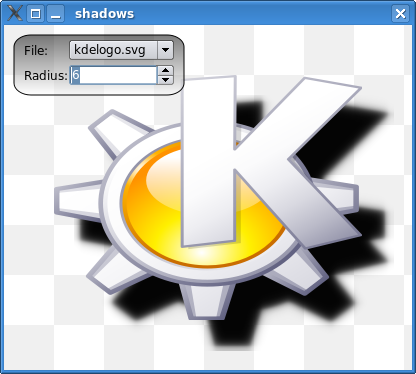
So to answer those question in general I wrote a small application that shows how to do shadows. There's couple of ways of getting the shadows look decently. The first step is getting a black rendering of whatever it is that you want to shadow. In this example we open a QPainter on the svg rendering that we want to shadow and we fill the entire area with black color. The trick is to set the composition operation to SourceAtop, which basically makes rendered area from the SVG black - exactly what we wanted. Once we have our rendering in black we can blur it. The code for the application along a couple of SVG's is here: http://ktown.kde.org/~zrusin/examples/shadows.tar.bz2. Finally images showing the results of our demo application follow:


Fun with SVG

On top of the selective rendering of SVG's another feature that I promised to implement was the ability of rendering a SVG file/element into an arbitrary rectangle on the surface.
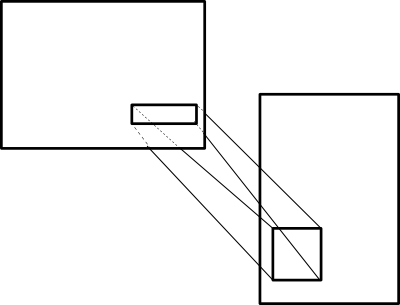
So one can have a SVG with some viewbox, that SVG can in turn have some element defined and one can have a surface with a whole different coordinate system and in that system have a rectangle on which the SVG element should be rendered. So in the picture it would look like this - SVG with an element mapped to another viewport with a custom bounding box.

Implementing it on top of selective rendering turned out to be rather simple. All we have to do is translate and scale (but we translate by the difference between the destination and mapped scaled coordinates of the source).

As always, I wrote a demo application to test it. In the application I have 4 SVG elements renderer at different locations within the same viewport and a circle with a radial gradient rendered on top of them. Here's how it looks:


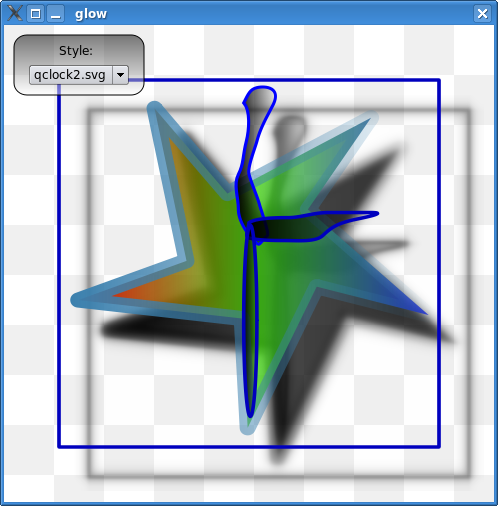
What's pretty nice about all of this is that it makes styling applications using SVG's pretty simple. For example I wrote a simple application that renders a clock, clock is stylable via SVG. SVG contains five elements with four predefined id's "face", "minutes", "hours" and "seconds". The application loads those element into respective spots and renders them. I couldn't help myself so besides rendering them I'm dynamically generating correct shadows for SVG shapes defined in the style files. It really is pretty cool. Here are the screenshots (yeah, yeah, I didn't have any time to create really good looking SVG clocks so you'll have to live with one's I slapped together :) ).


Ideally I'd love to see applications that do custom rendering stylable in the same way. For example KOrganizer for the calendar view could easily load SVG file that defines the look of that view. This way before new KDE releases we wouldn't have to be manually changing the look of applications to match the style or make them seem more modern - we would just add a new SVG file and that's it.

Thursday, August 03, 2006

SVG on graphicsview

A lot of people has been asking for a simple way of rendering SVG files on top of qgraphicsview. The only catch was that most of them wanted it along a way of doing selective rendering of SVG files. For example people create huge SVG files and use them as collection of items. Individual elements are nested inside a group element that has a predefined xml:id. I've spent most of yesterday just fixing things in QtSvg to make it possible. The thing that makes it tricky is the following: lets say that we have a SVG fragment with the following structure:
<g transform="scale(0.5,0.5)">
  <g id="myElem" transform="scale(2,2)">
    <rect x="0" y="0" width="2" height="2"       transform="translate(20,20)" />
  </g>
</g>
So we have a group that defines a transformation matrix and inside that group we have our predefined element with id="myElem". The question is what is the bounding box of our rectangle and how do we make sure it fills out the complete area of the rendering viewport. To do that we need to find the rendered element and traverse starting from that element down through its children propagating the transformation matrix correctly. So when we're in rect out transformation matrix is defined by the rect transformation (one translating by 20 in each direction) matrix muliplied by the parent transformation matrix (scaling by 2 in each direction). So the actual bounding box of the rectangle is x=40, y=40, width=4, height=4. Having that all we need to do is set our window to those dimensions and render the element. The code to traverse the SVG tree and QGraphicsSvgItem are already in Qt so once we'll update the snapshots you'll have it.

One of the things that are possible with it is for example having an entire card deck in an SVG file and putting individual cards into predefined groups. I wrote a quick example that takes such constructed SVG files, fetches the cards from the SVG and renders them with some arbitrary transformations on QGraphicsView. A pretty nice feature of it is that I made sure the SVG file has to be loaded only once. QGraphicsSvgItem's can share the context and are capable of picking the right parts of the SVG that actually constitute their whole visual appearance. Thanks to that no unecessary parsing or processing of the SVG tree takes place. A screenshot follows :)

So now it's possible to use QGraphicsView along SVG elements. And since QGraphicsItem's handle all input events one can do pretty nice things by using SVG to define look of the items and handle the logic in the code.

Monday, July 31, 2006

Compiling SVG to C++

The problem is that creating visually appealing widgets is rather difficult. The number of developers who can draw is about equal to the number of artists who know math ;) (and that's an extremely small number). Sometimes people ask me to do, what seems to be, absolutely trivial things, like giving them some code to do rounded rectangles. Having mockups doesn't help here because there's a long way from going from a semi-transparent gray rounded rectangle without an outline to : QPen pen(Qt::NoPen); QBrush brush(QColor(193,193,193,127)); painter.setPen(pen); painter.setBrush(brush); painter.drawRoundRect(10, 20, 80, 60, 25, 25);.

I was trying to figure out how can we make it easier. Using SVG is a very obvious solution. Sometimes though you want to make it a little bit more custom and using SVG might not seem like the best idea. I sat down after work today and created a SVG to C++ compiler. It's pretty interesting. You can do a mockup in your favourite SVG editor and then compile it to C++ and you have a widget. Or an artist could do a mockup and send the compiled widget and the svg to a developer who can then go nuts. Given that I've spent on it about 2 hours so far it's very basic. I'll try to see about releasing that code sometime soon. Right now it's based on an internal research implementation of SVG (yeah, I wrote of a few) I did a while back for Trolltech, so we'll have to figure out what to do with it. It's an interesting route that I'm not 100% convinced makes all that much sense. Maybe it would be better to just be able to say widget->fromSvg("svgfile.svg"); and have some api to figure out the shape/look of the widget directly from an SVG.

Anyway, sample generated output and the svgfile used to generate it, is at: http://ktown.kde.org/~zrusin/examples/svgtocpp.tar.bz2.

More blurring

Jani Huhtanen was kind enough to let me know that he's got another blurring algorithm that works even faster than Mario Klingemann Stack Blur algorithm. It seems to produce results that are a little further from gaussian blur than Stuck Blur but it works about 3-4 times faster which makes it a fantastic algorithm for people who just want to blur :) Thanks go to Jani for sending me his code.
I figured the code deserves a demo of its own so I quickly whipped out another sample app. Now we have a lens that does selective blur on our image (the code is not optimized because I wanted to see how it performs before optimizations - like for example for a real app you wouldn't blur the whole image as I am right now but only the part obscured by the lens). To show in screenshots:
Roberto with a unblurring lens on top:

Roberto blurred a little:

And blurred a little more:


The code is available at: http://ktown.kde.org/~zrusin/examples/expblur.tar.bz2

Today I also worked on Qt's OpenGL engine a bit, just cleaning things up. It would be so simple to do OpenVG implementation on top of our OpenGL engine that I'm tempted to just do it.
We got a new demo device from ATI as well today. It's very nice. Now to get Qtopia core running on it... First of all we need to get rid of all the glBegin/glEnd calls and switch things to vertex arrays and buffer objects which is something we should have had done a lot sooner but now it's really important as we want to be running on OpenGL ES natively.

Friday, July 28, 2006

Effects and Qt Jambi

Yesterday for fun I implemented a new blurring method. Blurring is a very common effect that opens quite a lot of possibilities. For example one can use it for shadows and it works very nicely when one is trying to deemphasise something visually. The algorithms that we had for it in KDE were not impressive at all. I went ahead and implemented Mario Klingemann's "Stack Blur" algorithm. I changed his algorithm a bit, mainly added support for handling alpha channel correctly and I was very impressed. It gives really nice results and is blindingly fast.
On a 385px by 385px image i was getting around 200fps with it. This is all software mind you and it should prove that software algorithms are good enough to still do a lot of visually appealing 2D things.

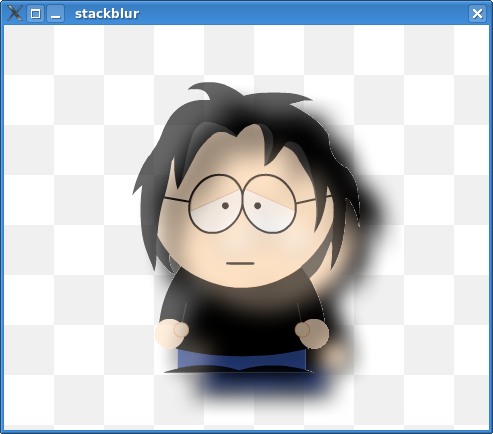
I'm not certain where I'm going to put the algorithm itself though. Qt will get an api for filters but that will happen for 4.3 most likely. I think it would make sense for people to start using this algorithm right now. Like I mentioned a few times I don't like KImageEffects class at all, because it's a mess. So for now I decided to release the algorithm itself as part of a small demo app. Roberto who saw my last demo app where I was using South Park head character asked me to use his character next time. So, first of all the application is available here. And now a few screenshots:
First this is plain Roberto:

Now Roberto blurred:

And finally Roberto with ghost-traces:

It all works incredibly fast so you should be happy with the results.

Gunnar blogged about Qt Jambi and if you have java running I suggest you give it a spin. When I showed some of the demo apps to people on KDE Four Core meeting they were very impressed (rightfully so I might add ;) ). I love the fact that with Qt Jambi I don't have to work with listeners. I just could never get myself to like or even tolerate the syntax for using listeners in Swing. Being able to automatically connect slots by name with QtJavaUtils.connectSlotsByName is just neat.

Thursday, July 27, 2006

Hardware accelerated polygon rendering

So in the spirit of writing down about the things I'm working on on a daily basis today comes hardware accelerated rendering of complex polygons. Ignacio Castaño finally convinced me to this ingenious method so all credit for it should go to him. I've spent last few moments at the office today looking into this method and it's just gorgeous so I'll give a brief overview of it.

In general all (at least Open Source) hardware accelerated vector graphics frameworks break up complex polygons in the process of tessellation. Like I mentioned in a few blogs before this process turns out to be quite complicated when trying to make it robust and fast. Ignacio's method beautifully avoids both problems.

So now to the method - the core idea is that we render to the stencil buffer and use it to correctly render the final polygon. So to use the Odd-Even fill rule we enable stencil writes and set up the stencil mask with glStencilMask(0x01) call. Next we make sure that the on passing the pixels are inverted with glStencilOp(GL_KEEP, GL_KEEP, GL_INVERT);. Then we can set the function and reference value for stencil testing by calling glStencilFunc(GL_ALWAYS, 0, ~0). Now we just render the vertices of our complex polygons as, for example triangles (fans would be just as suitable). Finally, we can enable color writes, disable stencil writes and enable stencil test and render a quad with the min/max coordinates of our polygon.

The method is awesome, as it (in theory) doesn't involve any kind of client side computations (besides a trivial min/max test) and (again in theory) operates in whole on the hardware. A wonderful sideeffect of all of this is that we avoid robustness issues that tessellation introduces.

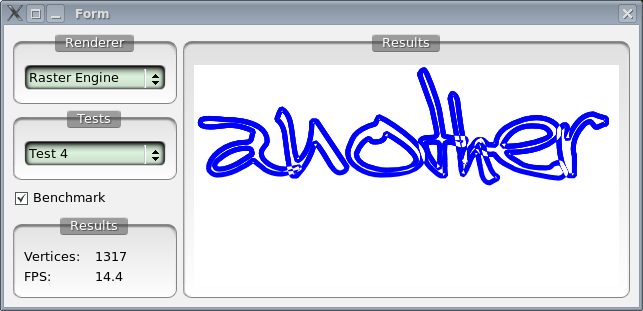
To test this method I wrote today an application to compare different methods of rendering complex polygons (full client side rasterization, trapezoidation on X11 with Xrender, triangulation with OpenGL and finally stencil tests with OpenGL). So far Ignacios stencil method is by far the best. A sample result showing rendering of a rather complex (1000+ vertices) polygon follows, first client side rasterization:

And now Ignacio's method:


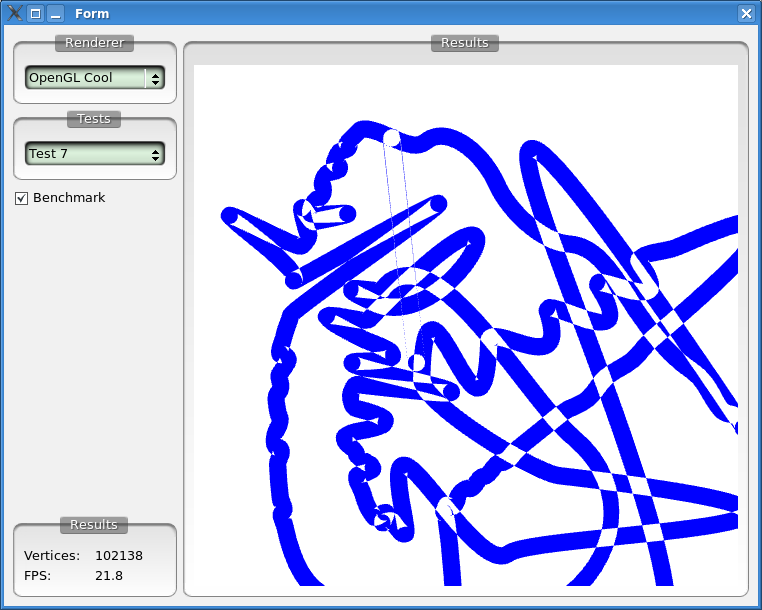
Finally an insane polygon I created for testing robustness (intersections at distances smaller than the resolution of doubles) and speed (it has segments with 100+ vertical vertices falling on a scanline). The new method can actually handle it correctly and with 100000+ vertices we still get usable performance. Pretty amazing, so thanks Ignacio for letting me know about this!

Tuesday, July 25, 2006

Animation and layout on paths

I finished the code to correctly map transformations along arbitrary paths (that includes bezier curves). It's extremely nice. The list of features that can be implemented on top of it is quite extensive. A two very obvious examples are animations along a path (as defined in SVG) and text layouting on arbitrary curves.

For example take a look at the following screencast (of course it's really smooth in reality but our screencasting software still has a long way to go, although I've been pretty nicely surprised this time). In this demo you can see a South Park character head (in this case it's mine) animated along a bezier curve with me manipulating the curve in real time.


So now to the math because it's rather neat. Moving along a path would be trivial if not that we have bezier curves in our paths. So the only tricky part is figuring out the transformation necessary to transform coordinate system suitably for arbitrary points on a bezier curve (that plus we need to find the length of the curve itself for which algorithm I could describe in a separate blog).

The parametric form of cubic bezier curve has the following form:
. In this case we need two algorithms to solve all our problems:

  • Nearest point on a curve - to correctly compute t on arbitrary positions within the curve

  • Tangent (or normal) vector to a point on the bezier curve - to compute our transformation given that the curve will be our attachment surface


The first one is described in detail in Graphics Gems 1. For the second all you have to do is take the derivative of the parametric equation. After simplification you should end up with:

Now we can compute the change in t by substituting the variables with the components of our control points. The vector that we get can be used to compute the slope of a line tangent to the curve at a given point. The last thing we need to do is compute the transformation matrix needed to transform our object. We do that by first translating the object to the point at the given t (we already have t and we get the point by substituting in the original equation) and then rotating the object by atan(slope of a tangent line) (this is assuming that we're transforming with regards to the horizontal axis). Extra points for doing all that with absolute minimal number of operations ;)

Or.. you could use Qt and we'll do all that for you.

Monday, July 24, 2006

Tessellation again

I've spent a little bit of time on our tessellator again. It seems that every time I do that another problem pops up. It's such a trivial algorithm that it's starting to become irritating. I'm getting more and more motivated to write a paper about it. There's a number of very fundamental issues here.
In the basic case, meaning simple polygons, tessellation is trivial and there are papers describing techniques to do in linear time like this or this. The problem is that most polygons that we currently decompose are not simple. Self-intersecting polygons with holes are very common and that's where most of our algorithms falls apart.

There are two papers describing handling such complex polygons: An implementation of a Near-Linear Polygon Triangulation Algorithm for General Polygons and
FIST: Fast Industrial-Strength Triangulation of Polygons. The detail that is usually not mentioned is that handling self-intersecting polygons in those algorithms has severe effects on their complexity (from nearly-linear to n^2*log*n).

Which leads to trivial conclusion #1: if tessellation of simple polygons is almost linear then would it be faster to unwind complex polygons and tessellate created this way simple polygons rather than tessellate directly one complex polygon. The only challenging aspect of unwinding polygons is finding the points where the polygon self-intersects. As a side-effect we venture into a lot better researched part of computational geometry - segment intersections. We can apply Bentley&Ottmann algorithm between the edges of a polygon and mix it with any of the snap-rounding techniques to try to handle precision problems.

Now this operates in nlogn but the catch is that when rendering large number of simple non-self-intersecting shapes we do a whole lot of work for absolutely nothing.

That in turn leads to conclusion #2: when rendering large amounts of simple primitives our fancy tessellation algorithm falls apart because it does a lot of work for absolutely nothing. Algorithmically there's nothing one can do here, you have to have a little bit of higher-level knowledge that can help you figure out whether the following primitive to be rendered is simple or not.
And now my latest thorn: when rendering complex polygons we generate a lot of trapezoids (due to the fact that almost every vertex forces generation) which after rasterization all fit within one scanline (happens very often when rendering on a big viewport mapped to a small window). So when the server is rasterizing those trapezoids it does a lot of work for nothing. The horizontal red spans in the following image show trapezoids which visually won't add anything to the rendering (after rasterization of them that is).

I'm still a little bit torn as to at which step should merging of those trapezoids actually happen.

Wednesday, July 12, 2006

Project Unity and eye-candy

I'm very happy that we got to do the WebKit integration during the KDE Four Core meeting and release it in the form of the Unity project. I think it's an interesting situation. We need an actively maintained web engine for KDE4, there's no question about that. In the past, due to the problematic situation we were in with Apple, I was leaning towards bringing Gecko into KDE. The reasoning was that if we're supposed to depend on an externally developed web engine it makes way more sense to depend on one that has been developed in the open. But Apple did tremendous amount of work to improve the situation and we now have an open WebKit (although the name could use a lot more work ;) ). I think it makes sense for us to join that effort, especially since most KDE developers understands that codebase a lot better than they do Gecko. Apple is using WebKit in a more desktop-aware fashion (e.g. dashboard) and it would be real nice if we could share those parts between OS X and KDE as well. There is tremendous amount of things that can be done with a well developed web engine on the desktop. Bridging in network connectivity/internet services and the desktop is one of the most visible trends in computing right now and KDE has to make sure it's ready for it. SVG, XSLT, XPath and CSS create one hell of framework with which a lot can be accomplished and we have a lot of ideas about some of the new things we could do with it. I guess we'll see what happens next.

Lubos writes that KDE needs someone to work on composition manager for KDE 4 because I don't have time. Which is only partially true. It reminds me of a conversation I had with George and Dirk during the KDE Four Meeting right before we started working on project Unity.
Dirk: What rendering framework is WebKit using on Windows?
George: Cairo.
Dirk: And on OS X?
George: CoreGraphics.
Dirk: What are we going to use?
George: Zack...
And to tell the truth, before we even had working CMake files to compile Unity, the graphics layer has been already ported (the only thing I haven't done was support for shadows, but that's not really crucial.. yet). And as to my lack of time to work on KWin, it's really not that simple. Almost everyone wants me to work on something for them and with Lubos using the goofiest indention ever (KWin's workspace.cpp :) ) KWin is not even close to being near the top of my todo (not to say that I'd suddenly start working 24/7 on it if it used Qt indention, but with long todo's and lack of sleep things like being comfortable while working on a codebase are hugely important).

I'm back in the US because today I've started my week long vacations. I don't have a laptop (and haven't had a working one for almost a year since I broke the last one while working on Exa, which is btw, a great testament for those who think that people working on Open Source make a lot of money) so this is going to be the first week in about 8 years when I won't do any programming. I'll spend the week compensating for my European starvation diet. By the way of my diet, for the KDE Four Meeting Aaron brought a whole box of vegan food that Tracy and him assembled for me in Calgary. It was really cool and it meant a lot to me, so yeah, thank you guys :)

Saturday, July 01, 2006

Fun with curves

During the last few days I've decided that besides some serious bug fixing for Qt 4.2 tech preview I'll work a little on bezier curves. I started looking at interpolation with bezier curves in order to improve the quality of some of the polygons that we're rendering.
For example in 4.2 we actually construct paths from bitmap fonts. The algorithm that we use is basically following the edges doing lineto's between individual elements. The problem is that once you zoom it quite a bit you can see the edges. It's a problem that most SVG's is suffering from as well (blockiness due to extensive usage of lines instead of curves). My algorithm is largely similar to what Maxim Shemanarev did in AGG. The results are really good, so I'm very happy and I hope to get it in soon.
While working on that I used the math in few more places. I finished up the code to do object positioning along a custom path. Which we need in two places: animation support for objects moving along a path and text layout on a path. Both are extremely nice features.
The work Simon is doing on text layouting is just awesome. I'm extremely happy we now have the ability to add application private fonts by working with a truetype file directly. The last time I looked at Poppler it was one of those outstanding things that have been missing. One more missing feature there is the ability to create custom fonts directly from paths and getting Scribe to use them. For example in SVG I've been hacking around it by falling back to a very primitive custom layouting strategy (instead of using Scribe) every time the font that's being specified is a custom font constructed from paths.

Last week, Donald, one of the support engineers from Trolltech, got me to try out his snakeboard. (btw, if you never heard the South African accent i strongly recommend you meet someone from there right away because it's quite an experience). I'll stick to skateboards. Boy, was this sucker hard to control. And Donald figured that the best way to learn how to ride is to try it downtown right next to the harbor. Oh, yeah, because when I'm eating dirt I like as many people as possible to see me. Fortunately after about three fours we've been asked to leave after Donald, in a very crude way, tried to measure the vertical distance between his back and the pavement.

Oh, if I haven't responded to any of your emails it's most likely because I lost them last week.
Today we're kicking off the KDE Four meeting. My birthday is tomorrow and I'll spend it working locked in a cabin, neato ;)

Tuesday, June 13, 2006

In Norway

I've been in Norway for almost a week now. The weather has been real nice for the last few days so I think I even might have been complaining a little less than I usually am when in Norway =)

So for the last few days I've been working on making sure that svg works nicely on top of QGraphicsView. And boy does it rock. I went ahead and implement a lot more of SVG (the more dynamic stuff) and because it's all on graphicsview I can edit SVG's on the fly. Here's a screenshot:


One thing that I've been lacking in Arthur and I hacked around it in QtSvg is the ability to set explicit transforms on brushes (meaning transformations on fills and strokes that don't affect the rendering shape). It's a pretty trivial feature (assuming you know your linear algebra ;) ) so I went ahead and added support for transformed brushes today. So now QBrush has a setTransform method that applies to both textures and gradients and is independent of the main painter transformation matrix. You can do some cool stuff with it like:

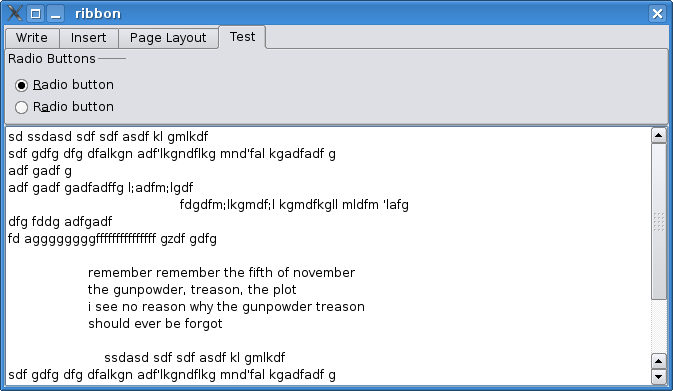
Now finally I added some api to make sure that things like the Office 12 Ribbon widget are possible in Qt. I don't think that I'll have the time to finish a full blow ribbon like widget for 4.2 but at least we made sure it's possible to implement it in applications using Qt. Obligatory screenshot:

Now I do a lot of things but one thing I'm really bad at is cooking (for definitions of cooking that include the phrase "eatable meal" because I'm really good at burning "things" - referred to here as "things" because in most cases once I'm done cooking, it's impossible to identify what was it that I was cooking... could be a shoe, you'll never know and the difference is miniscule anyway). My lack of skill there is not a problem in US but makes for a one hell of a diet plan in Norway (i believe the technical term for it is "death by starvation"). Last week I had a real nice conversation with a certain lady. I asked whether she has any vegetarian sandwiches to which she replied "yes! of course" and proceeded to hand me a ham-sandwich. I politely declined and mentioned that one must stretch the definition of "vegetarian" real far before it includes the subpoint saying that eating ham is ok. To which she (visibly excited by the brilliance of the following idea) said: "but if you take out the ham it's vegetarian!". It's really hard to argue with that logic, but no, despite the popular belief "meat-meal minus meat does not equal vegetarian meal". In fact it doesn't even equal a meal. It qualifies as "a something on a plate" (given there's a plate in that equation at all) but not much more. Now a nice thing about all of this is that every morning I get to count all my ribs in a mirror and so far so good, they're all there.

Thursday, May 25, 2006

Toronto

The last two days were a lot of fun. Yesterday I went to Toronto for a meeting with ATI mobile team. The trip itself was pretty entertaining. I have a lot of things on my schedule so just five days ago I managed to give a definite answer to the question of whether I can come to Toronto. US Airways likes to overbook their flights, so after getting to the airport at 9am yesterday I found out that I can't get on my flight to Buffalo because it was full. I was supposed to meet up with David in Buffalo so we had to quickly change our plans and I took a flight directly to Toronto. Once I got there David and I ate lunch at a very nice Indian place and went to meet ATI guys. We talked about OpenVG, OpenGL ES and their mobile lineup. Getting to meet those guys was a lot of fun and the discussion was just great. Very productive for me. At the end we all went to grab dinner at a place called 'Spicy Momma'. That's one hell of a name for a restaurant! They're definitely not false advertising too (referring to the "spicy" not "momma" part). Two of the guys from the ATI team was vegetarian so we were able to team up and get lots of vegie food.
Since we haven't booked a hotel, after dinner we had to go and look for a place to stay. We found a hotel fairly quickly. We also got some cookies from the girl working at the reception desk (she baked them herself and in this case that was a good thing) and my "happy life" receipt has 'free cookies' very high up on the list, so that made me pretty happy =)
Today the weather was wonderful so we stopped on our way back at the Niagara falls and decided to eat lunch at a place with a great view. It's one of those places that just makes you feel better (even being a city boy myself). Fun.

Monday, May 22, 2006

Improving reality

Historically there has been a big gap between real world and computer interfaces. Things behave one way in real world and our desktop applications behave another. I'd like to see us moving to some extend away from that. I've been talking about physics simulations becoming more widespread on the desktop last summer and ever since I went through a lot of them. Over the weekend I started looking into moving to a real physics engine. Open Dynamics Engine is, as far as I know, the best one. Problem there is that for desktop apps cloth, rope and water simulations are way more useful and currently it, still, takes too much effort to mimic them.

I'd just like to have a model, where moving from reality to the computer interface doesn't involve much of a mental switch. Or at least it's very natural. I'm not saying that it should behave exactly like something out there but it needs to be a lot more dynamic than what we have right now. Which is really, what we refer to when we talk about "organic interfaces".

There are some things that are spot on, that improve on what you normally get in real life and make computers act as what they really are, tools. Yesterday I was writing something by hand, thinking "man, this would be so much easier with a spell checker". You know you got something right, if you really miss it while performing a similar activity outside the computer world.

Talking about spell checking I played a bit with Sonnet over the weekend. I've been handling KSpell, then KSpell2 for a while and then I just grew tired of it last summer (for various reasons not really related to the code itself). I've been toying with the idea of full linguistic framework for a while. Besides spell checking we're talking about grammar checker, dictionary, thesaurus and translator. Sonnet is just that - full linguistic framework. I'd like to have all those functions available to all KDE applications. Being able to take a step back, look at all the problems I've seen and complains I got over the years from both users and developers and just sit down and rework the whole framework to fix them is great. Linguistics is fascinating and for some reasons there's not a whole lot of people who'd want to deal with it, at least not as far as its desktop usage goes.

Wednesday, May 17, 2006

Random thoughts

I just remembered that I never mentioned how great Brazil was. And I definitely have to mention the fact that I've been taught how to play "Svn Trunk" which is the best card game I've ever seen. I believe the game is known as "Trucu" in Brazil, but since I've learned it, it's now internationalized and it's been renamed ;) For KDE 4 I'd like to have a common card canvas that things like KPat and in future "KDE SVN Trunk" can share (with some really great winning animations because unless there's a neat animation at the end, winning is pointless).
I'd like to make card decks stylable via SVG as well.
See this?
If that's not the proof that I'm the greatest international Trucu player I don't know what is...

Oh, and today my softrucks arrived. It's been raining a bit lately and I have too many skateboards around to not be able to break something daily on one of them. I'll sit down later tonight to install them on a board and will give it a spin. So if you won't see anything interesting happening graphics wise in Qt/KDE/X in the near future it's because Softrucks don't work that well and I'm most likely in a hospital =)

On a sidenote, a new version of Jahshaka (repeat quickly four times for an additional point bonus) has been released. That application is very impressive.

Monday, May 15, 2006

Precision

One of the most difficult problems of computer graphics today is producing truly robust algorithms. Working in floating point coordinate system introduces a lot of subtle problems. Computational geometry approaches the problem from two directions:
1) Implementing algorithms on top of rational numbers.
2) Introducing rounding phases to algorithm, usually in a post processing stage.

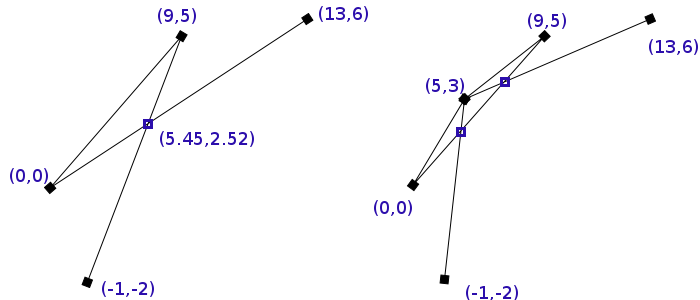
For example lets look at a pretty popular example, based on the one from Hobby's paper. In this example we have three line segments with one intersection between them. Now if we round up the intersection to integer coordinates two new intersections are introduced - ones that are completely incorrect. Although we don't round up that heavily the following example scales into infinity as you uniformly divide coordinates by the same number.


There are two main reasons why this behavior is so undesirable for graphics.
1) It produces obviously incorrect results.
2) Optimized algorithms often break down due to those inconsistencies.

The first one is actually less important - on this scale the degeneration of our results is likely to produce errors that won't have too significant effects on what you see on the screen. Two is a lot more severe. For example a lot of the more popular geometrical algorithms includes a step of finding segments containing a point. Assuming that a segment has floating point coordinates and the point is, as well, in floating point coordinates - the containment test will very quickly break down as the limited precision will hit the computations. So there's no way to reliable perform that test, due to which all those algorithms will simple fail. As a result, an incredibly small rounding error will likely cause a complete failure of an algorithm and because of that small error you won't see any results on the screen. That's a serious problem.

Going back to the solutions to this problem. John Hobby wrote a paper entitled "Practical Segment Intersection with Finite Precision Output". Algorithm which he introduced in that paper has since been named "snap rounding". Numerous papers have been written since about this algorithm, some of the better ones include "Iterated Snap Rounding" by Halperin and Packer and "Snap Rounding Line Segments Efficiently in Two and Three Dimensions" by Goodrich and Guibas. The basic principle of this algorithm is very simple; every event point is computed within some tolerance square. Every tolerance square has its middle computed and all events that we encounter, whose coordinates fall withing already existing tolerance square are "bent" in a way that changes their coordinate to be equal to the middle of the tolerance square. This technique works surprisingly well.

The second method, often employed by professional grade geometrical software, involves replacing float/double by a custom "rational" number class. They produce mathematically correct results, which is ideal. The reason why we can't really even consider them is that they're about 30+ times slower than doubles.

Now the reason I went on this rant is that I've been testing results of my new algorithm for rasterizing polygons, which involves decomposition, and even though on paper the algorithm was always correct and the unit tests were all passing, the algorithm was falling apart in some cases. I've spent a while going through my intersection detection code, snap rounding implementation and couldn't find anything. Then I looked at some of the data files I had and they were only in limited precision of .001 which is not even close enough to being precise enough for floating point intersections/coordinate systems. Feel my pain =)

Thursday, May 11, 2006

The basics

If you look at the frameworks we have and the way 2D graphics is heading, it's obvious everything we render is really a polygon. Rendering any other primitives is more an optimization than anything else. There's a few reasons for that. One of the more important ones is the complexity that is introduced with stroking (I'd crack a joke about difficulties of stroking here but lets skip that). For example lets look at the rectangle underneath. We're using a linear gradient stroke on it:

What should be obvious is that it's actually two shapes. We have the fill but we also have the stroke . Here be dragons, because the stroke is not a rectangle anymore! It's a polygon with hole! So rendering this seemingly simple shape suddenly becomes rather complex. Now a lot of people will notice that a simple hack could be to draw two rectangles
as in : first and then with the ending result being . Then of course you need to special case because if the fill has an alpha you will end up with which is cleary incorrect as now the fill seems to have a gradient... Further more if we're overlaying shapes that optimization is right out. So on this extremely simple example we can see that special cases are accumulating very quickly and the code gets really convoluted very quickly. The question becomes whether making the code so ugly and error prone (especially as the number of conditions which affect what kind of rendering path the code takes, accumulates) is a good trade of for small optimizations.

Without the support for stroking and alpha-blending, things tend to be easy. Unfortunately the reality of the fact is that both are hard requirements for any decent rendering framework. So for all of you who've been wondering why the new rendering frameworks are slower than the code you were using so far to draw rectangles and lines, now you know. In Qt we try to make people happy by having all those special cases, by reverting back to using Xlib whenever possible and, of course, by improving the frameworks but it's just a lot of work. I'll try to go over some of the things I'm doing with graphics in Qt, KDE and X.