In general I'm extremely good at ignoring emails and blog posts. Next to head-butting it is one of the primary skills I've developed while working on Free Software. Today I will respond to a few recent posts (all at once, I'm a mass-market responder) about accelerating graphics.
Some kernel developers released a statement saying that binary blobs are simply not a good idea. I don't think anyone can argue that. But this statement prompted a discussion about graphics acceleration, or more specifically a certain vendor who is, allegedly, doing a terrible job at it.
First of all the whole discussion is based on a fallacy rendering even the most elaborate conclusions void. It's assumed that in our graphics stack there's a straight forward way between accelerating an api and fast graphics. That's simply not the case.
I don't think it's a secret that I'm not a fan of XRender. Actually "not a fan" is an understatement I flat out don't like it. You'd think that the fact that 8 years after its introduction we still don't have any driver that is actually real good at accelerating that "simple API" would be a sign of something... anything. When we were making Qt use more of the XRender api the only way we could do that is by having Lars and I go and rewrite the parts of XRender that we were using. So what happened was that instead of depending on XRender being reasonably fast we rewrote the parts that we really needed (which is realistically just the SourceOver blending) and did everything else client side (meaning not using XRender)
Now going back to benchmarking XRender. Some people pointed out an application I wrote a while back to benchmark XRender: please do not use it to test a performance of anything. It will not respond to any real workloads. (also if you're taking something I wrote to prove some arbitrary point, it'd be likely a good idea to ping me and ask about it. You know on account of writing it, I just might have some insight into it). The thing about XRender is that there's a large amount of permutations for every operation. Each graphics framework which uses XRender uses specific, defined paths. For example Qt doesn't use server-side transformations (they were just pathetically slow and we didn't feel it would be in the best interest of our users to make Qt a lot slower), Cairo does. Accelerating server side transformations would make Cairo a lot faster, and would have absolutely no effect on Qt. So whether those tests pass with 20ms or 20hours has 0 (zero) effect on Qt performance.
What I wanted to do with the XRender performance benchmarking application is basically have a list of operations that need to be implemented in driver to make Qt, Cairo or anything else using XRender fast. "To make KDE fast look at the following results:" type of thing. So the bottom line is that if one driver has for example result of 20ms for Source and SourceOver and 26 hours for everything else and there's second driver that has 100ms for all operations, it doesn't mean that on average driver two is a lot better for running KDE, in fact it likely means that running KDE will be five times faster on driver one.
Closed sourced drivers are a terrible thing and there's a lot of reasons why vendors would profit immensely from having open drivers (which is possibly a topic for another post). Unfortunately I don't think that blaming driver writers for not accelerating graphics stack which we went out of our way to make as difficult to accelerate as possible is just a good way of bringing that point forward.

Showing posts sorted by relevance for query performance. Sort by date Show all posts
Showing posts sorted by relevance for query performance. Sort by date Show all posts
Friday, June 27, 2008

Sunday, September 18, 2011
NV path rendering
A while ago NVIDIA released drivers with their NV_path_rendering extension. GL_NV_path_rendering is a relatively new OpenGL extension which allows rendering of stroked and filled paths on the GPU.
I've heard about it before but lately I've been too busy with other stuff to look at, well, anything.
I've decided to spend a few seconds looking at the videos NVIDIA posted on their site. They were comparing the NV_path_rendering, Skia, Cairo and Qt. Pretty neat. Some of the demos were using huge paths, clipped by another weird path and using perspective transforms. Qt was very slow. It was time for me to abandon my dream of teaching my imaginary hamster how to drive a stick shift and once again look at path rendering.
You see, I wrote the path rendering code so many times that one of my favorite pastimes was creating ridicules paths that no one would ever think about rendering and seeing how fast I could render them. Qt's OpenGL code was always unbelievably good at rendering paths no one would ever render. Clearly these people were trying to outcrazy me.
Fortunately there's an SDK posted on the NVIDIA site and it's really well done. It even compiles and works on GNU/Linux. Probably the best demo code for a new extension that I've ever seen. The extension itself is very well done as well. It's very robust, ultimately though it's the implementation that I care about. I have just one workstation with an NVIDIA card in it, a measly Quadro 600, running on a dual processor xeon e5405, but it was enough to play with it.
The parts using Qt were using the raster engine though. I've looked at the code and decided to write something that would render the same thing but using just Qt. The results were a little surprising. Qt OpenGL could render tiger.svg scaling and rotating it at about 270fps, while the NV_path_rendering was running at about 72fps. Here's both of them running side by side:

(numbers lower for both on account of them running at the same time of course). As you can see Qt is almost 4x faster. I've figured it might be related to the different SVG implementations and rendering techniques used, so I quickly hacked the demo NVIDIA posted to open a brand new window (you need to click on it to start rendering) and render to QGLPixelBuffer but using the same SVG and rendering code as their NV_path_rendering demo code. The results were basically the same.
I posted the code for the Qt demo and the patch to nvpr_svg on github: https://github.com/zackr/qt_svg
The patch is larger than it should be because it also changed the file encoding on the saved files from DOS to Unix but you shouldn't have any issues applying it.
So from a quick glance it doesn't seem like there are any performance benefits to using NV_path_rendering, in fact Qt would likely be quite a bit slower with it. Having said that NVIDIA's implementation looks very robust and a lot more numerically stable. I've spent a little bit of time looking at the individual pixels and came away very impressed.
In general the extension is in a little bit of a weird situation. On one hand, unlike OpenVG which creates a whole new API, it's the proper way of introducing GPU path rendering, on the other hand pretty much every vector graphics toolkit out there already implements GPU based path rendering. Obviously the implementations differ and some might profit from the extension but for Qt the question is whether that quality matters more than the performance. Specifically whether the quality improves enough to justify the performance hit.
I think the extension's success will largely depend on whether it's promoted to, at least an EXT or, ideally an ARB, meaning all the drivers support it. Using it would make the implementations of path rendering in toolkits/vector graphics libs a lot simpler and give driver developer a central place to optimize a pretty crucial part of the modern graphics stack. Unfortunately if you still need to maintain the non NV_path_rendering paths then it doesn't make a whole lot of sense. Mesa3D implementation would be trivial simply because I've already implemented path rendering for OpenVG using the Gallium3D interface, so it'd be a matter of moving that code but I'm just not sure if anyone will be actually using this extension. All in all, it's a very well done extension but it might be a little too late.
I've heard about it before but lately I've been too busy with other stuff to look at, well, anything.
I've decided to spend a few seconds looking at the videos NVIDIA posted on their site. They were comparing the NV_path_rendering, Skia, Cairo and Qt. Pretty neat. Some of the demos were using huge paths, clipped by another weird path and using perspective transforms. Qt was very slow. It was time for me to abandon my dream of teaching my imaginary hamster how to drive a stick shift and once again look at path rendering.
You see, I wrote the path rendering code so many times that one of my favorite pastimes was creating ridicules paths that no one would ever think about rendering and seeing how fast I could render them. Qt's OpenGL code was always unbelievably good at rendering paths no one would ever render. Clearly these people were trying to outcrazy me.
Fortunately there's an SDK posted on the NVIDIA site and it's really well done. It even compiles and works on GNU/Linux. Probably the best demo code for a new extension that I've ever seen. The extension itself is very well done as well. It's very robust, ultimately though it's the implementation that I care about. I have just one workstation with an NVIDIA card in it, a measly Quadro 600, running on a dual processor xeon e5405, but it was enough to play with it.
The parts using Qt were using the raster engine though. I've looked at the code and decided to write something that would render the same thing but using just Qt. The results were a little surprising. Qt OpenGL could render tiger.svg scaling and rotating it at about 270fps, while the NV_path_rendering was running at about 72fps. Here's both of them running side by side:

(numbers lower for both on account of them running at the same time of course). As you can see Qt is almost 4x faster. I've figured it might be related to the different SVG implementations and rendering techniques used, so I quickly hacked the demo NVIDIA posted to open a brand new window (you need to click on it to start rendering) and render to QGLPixelBuffer but using the same SVG and rendering code as their NV_path_rendering demo code. The results were basically the same.
I posted the code for the Qt demo and the patch to nvpr_svg on github: https://github.com/zackr/qt_svg
The patch is larger than it should be because it also changed the file encoding on the saved files from DOS to Unix but you shouldn't have any issues applying it.
So from a quick glance it doesn't seem like there are any performance benefits to using NV_path_rendering, in fact Qt would likely be quite a bit slower with it. Having said that NVIDIA's implementation looks very robust and a lot more numerically stable. I've spent a little bit of time looking at the individual pixels and came away very impressed.
In general the extension is in a little bit of a weird situation. On one hand, unlike OpenVG which creates a whole new API, it's the proper way of introducing GPU path rendering, on the other hand pretty much every vector graphics toolkit out there already implements GPU based path rendering. Obviously the implementations differ and some might profit from the extension but for Qt the question is whether that quality matters more than the performance. Specifically whether the quality improves enough to justify the performance hit.
I think the extension's success will largely depend on whether it's promoted to, at least an EXT or, ideally an ARB, meaning all the drivers support it. Using it would make the implementations of path rendering in toolkits/vector graphics libs a lot simpler and give driver developer a central place to optimize a pretty crucial part of the modern graphics stack. Unfortunately if you still need to maintain the non NV_path_rendering paths then it doesn't make a whole lot of sense. Mesa3D implementation would be trivial simply because I've already implemented path rendering for OpenVG using the Gallium3D interface, so it'd be a matter of moving that code but I'm just not sure if anyone will be actually using this extension. All in all, it's a very well done extension but it might be a little too late.
Sunday, February 25, 2007
Browsers, performance and interventions
This week I beat WebKit Qt's rendering into shape. I rewrote the theming and canvas code.
 It works so nicely that I'm actually pretty happy with it. The rewrite helped me fix issues with statically positioned elements (which just didn't work on a scrollview/canvas combination I did before). Due to which my blog finally looks and behaves correctly as seen on the screenshot above. That plus scrolling is about 10x faster and you never see gray areas on scrolling as you did before.
This week George Staikos has been here in Oslo to work with us on the networking code. George and I have been friends for five or six years and he has this nasty habit that forces me to start an intervention and try to get him off it. What I'm referring to is the fact that George has been Canadian for, well his entire life, and it is my professional opinion (but I'm not a doctor) that he needs to move on. I'm not sure in which culture it is customary to bring Snapple ice-tea to your friends when you come to see them but we need to change him to that because he definitely didn't bring me any this time and that's just rude.
Going back to work, I'm sure Lars will blog about the networking magic they did so I'll keep my mouth shut. Once the code they were working on will be ready (which should happen within next week or two) and we'll start using in WebKit, we'll make the transition and start using WebKit Qt based browser on a daily basis. So we're close which is pretty exciting.
We have also started optimization run for Qt 4.3. My grand plan is to make sure Qt 4.3 is 2x faster in general rendering code than Qt 4.2 was. I have a list of algorithms to shave and rewrite over the next few weeks which will be rather challenging.
By the way of performance some people noticed that Qt OpenGL in recent snapshots with Antialiasing turned on is actually slower than it was in Qt 4.2. It's because of an experiment that we're trying on. We're now using GLSL to antialias primitives. Of course it's a lot slower than the old code but produces very high quality results. I don't really like it though because the performance hit is just too big.
 It works so nicely that I'm actually pretty happy with it. The rewrite helped me fix issues with statically positioned elements (which just didn't work on a scrollview/canvas combination I did before). Due to which my blog finally looks and behaves correctly as seen on the screenshot above. That plus scrolling is about 10x faster and you never see gray areas on scrolling as you did before.
This week George Staikos has been here in Oslo to work with us on the networking code. George and I have been friends for five or six years and he has this nasty habit that forces me to start an intervention and try to get him off it. What I'm referring to is the fact that George has been Canadian for, well his entire life, and it is my professional opinion (but I'm not a doctor) that he needs to move on. I'm not sure in which culture it is customary to bring Snapple ice-tea to your friends when you come to see them but we need to change him to that because he definitely didn't bring me any this time and that's just rude.
Going back to work, I'm sure Lars will blog about the networking magic they did so I'll keep my mouth shut. Once the code they were working on will be ready (which should happen within next week or two) and we'll start using in WebKit, we'll make the transition and start using WebKit Qt based browser on a daily basis. So we're close which is pretty exciting.
We have also started optimization run for Qt 4.3. My grand plan is to make sure Qt 4.3 is 2x faster in general rendering code than Qt 4.2 was. I have a list of algorithms to shave and rewrite over the next few weeks which will be rather challenging.
By the way of performance some people noticed that Qt OpenGL in recent snapshots with Antialiasing turned on is actually slower than it was in Qt 4.2. It's because of an experiment that we're trying on. We're now using GLSL to antialias primitives. Of course it's a lot slower than the old code but produces very high quality results. I don't really like it though because the performance hit is just too big.
Monday, October 23, 2006
Benchmarks
A lot of people has been asking me about some performance comparison for the vector graphics framework we have. Rendering polygons, especially when we're dealing with stroke, tends to be the most expensive rendering operation performed in vector graphics. I constructed a little test, which tests raw polygon rendering power of Qt and Cairo.
For the test I used the latest Qt main branch, and the master branch from Cairo's Git repository.
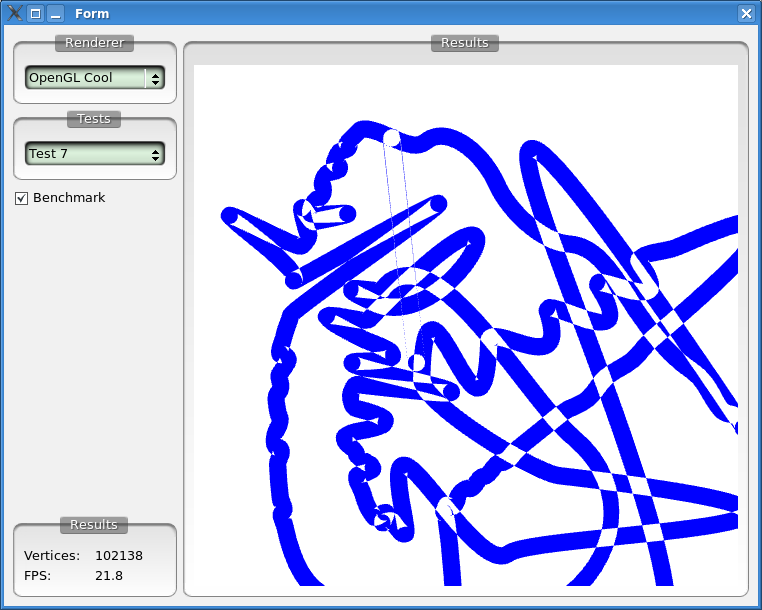
The test is composed of rendering three complex polygons. The first one is a text path, the second is a small polygon with a large amount of vertices that fall on the same scanline and the third one is a huge polygon with about 100000 vertices.
The results measure frames per seconds at which each framework was capable of rendering the given testcase. Therefore the larger the better.
I tried being as objective as possible. All tests go through the whole pipeline, meaning I tried to make sure that the framework doesn't cache too much and actually renders what's being asked. I used latest version control code for all frameworks. The data used in the tests is available here: http://ktown.kde.org/~zrusin/complex.data (newline separated polygons whose coordinates are comma separated). All tests were written to utilize antialiasing.
Oh and all tests have been done on a machine with Pentium(R) 4, 3.20GHz processor, 1 GB RAM and NVIDIA 6600 with 1.0-9625 drivers.
Having said that the results were (charts follow):
First just pure Cairo vs Qt native performance:

Qt was respectively 7, 5 and 6 times faster. Than Cairo in those plain tests. This is a direct result of Qt's new wicked tessellator in 4.3.
But all the frameworks have many backends, the most interesting one being the OpenGL backend. For 4.3 I devised a new method of rendering polygons for the OpenGL, based on stencil clipping. So lets see how Qt's OpenGL engine compares to Qt's native XRender engine:

The difference is huge. Qt OpenGL rendered the first polygon at 487 frames per second vs 76 in Qt XRender engine. Note though, that in XRender we tessellate which is of NlogN complexity, in OpenGL I'm able to render polygons in a completely linear fashion. The method does deteriorate for polygons with 80000+ vertices due to large amount of triangles that has to be processed - it's a GPU bottleneck though which means that with a more powerful graphics card those results would skyrocket.
Finally, lets combine the results of all the frameworks and see how they match-up:

The reason for Cairo with Glitz backend yielding the same results as Cairo with XRender backend is that polygon rendering in both of those goes through the same client-side steps all the way until the final blit and it's not the blit but the tessellation and rasterization that are the bottlenecks. I added Amanith to the results because some people mentioned it in my blog before. Both Amanith and Cairo (Cairo only with native XRender backend) crash on the last polygon. In Amanith the tessellator seems to fall apart. In the Cairo case application crashes in the XRender code, so most likely rasterization code is not keen on one the trapezoids that Cairo sends it. Cairo with Glitz backend render the last polygon at about 0.2 frames per second (but doesn't crash which again shows that it's likely XRender's trapezoid rasterization code, especially that Carl couldn't reproduce the given crash on his laptop). Interesting fact right now is that Qt with XRender is way faster at rendering polygons than Amanith and Cairo with Glitz, both of which are OpenGL accelerated.
Notes: I know Carl is working on a new tessellator for Cairo which should exhibit the same logarithmic behaviour as the current Qt one. Carl was kind enough to even send me a tarball of the branch in which he's working on it. Unfortunately, although the results for the first polygon were at about 13 FPS (2 frames per second better than the current Cairo tessellator) they were degenerating for other two polygons. This is most likely due to large precision of the new tessellator (in both #2 and #3 testcases you get vertices close enough to consider them coinciding without any visual artifacts). Once Carl will get the precision down and integrate the new tessellator I'm going to run the tests again.
Conclusion from all those tests is that right now Qt is leaps ahead of any other vector graphics framework in terms of raw performance. Nothing comes even close. Qt's OpenGL engine is so fast it's basically unfair to compare anything else to it.
Objectivity aside, Qt rocks. It really does. And if you're using Qt and not using Qt's rendering architecture, everyone should point at you and make fun of you for not having complete and utter trust in me, as the only true graphics ninja and the team of Trolltech's Samurai Graphics Assassins.
For the test I used the latest Qt main branch, and the master branch from Cairo's Git repository.
The test is composed of rendering three complex polygons. The first one is a text path, the second is a small polygon with a large amount of vertices that fall on the same scanline and the third one is a huge polygon with about 100000 vertices.
The results measure frames per seconds at which each framework was capable of rendering the given testcase. Therefore the larger the better.
I tried being as objective as possible. All tests go through the whole pipeline, meaning I tried to make sure that the framework doesn't cache too much and actually renders what's being asked. I used latest version control code for all frameworks. The data used in the tests is available here: http://ktown.kde.org/~zrusin/complex.data (newline separated polygons whose coordinates are comma separated). All tests were written to utilize antialiasing.
Oh and all tests have been done on a machine with Pentium(R) 4, 3.20GHz processor, 1 GB RAM and NVIDIA 6600 with 1.0-9625 drivers.
Having said that the results were (charts follow):
First just pure Cairo vs Qt native performance:

Qt was respectively 7, 5 and 6 times faster. Than Cairo in those plain tests. This is a direct result of Qt's new wicked tessellator in 4.3.
But all the frameworks have many backends, the most interesting one being the OpenGL backend. For 4.3 I devised a new method of rendering polygons for the OpenGL, based on stencil clipping. So lets see how Qt's OpenGL engine compares to Qt's native XRender engine:

The difference is huge. Qt OpenGL rendered the first polygon at 487 frames per second vs 76 in Qt XRender engine. Note though, that in XRender we tessellate which is of NlogN complexity, in OpenGL I'm able to render polygons in a completely linear fashion. The method does deteriorate for polygons with 80000+ vertices due to large amount of triangles that has to be processed - it's a GPU bottleneck though which means that with a more powerful graphics card those results would skyrocket.
Finally, lets combine the results of all the frameworks and see how they match-up:

The reason for Cairo with Glitz backend yielding the same results as Cairo with XRender backend is that polygon rendering in both of those goes through the same client-side steps all the way until the final blit and it's not the blit but the tessellation and rasterization that are the bottlenecks. I added Amanith to the results because some people mentioned it in my blog before. Both Amanith and Cairo (Cairo only with native XRender backend) crash on the last polygon. In Amanith the tessellator seems to fall apart. In the Cairo case application crashes in the XRender code, so most likely rasterization code is not keen on one the trapezoids that Cairo sends it. Cairo with Glitz backend render the last polygon at about 0.2 frames per second (but doesn't crash which again shows that it's likely XRender's trapezoid rasterization code, especially that Carl couldn't reproduce the given crash on his laptop). Interesting fact right now is that Qt with XRender is way faster at rendering polygons than Amanith and Cairo with Glitz, both of which are OpenGL accelerated.
Notes: I know Carl is working on a new tessellator for Cairo which should exhibit the same logarithmic behaviour as the current Qt one. Carl was kind enough to even send me a tarball of the branch in which he's working on it. Unfortunately, although the results for the first polygon were at about 13 FPS (2 frames per second better than the current Cairo tessellator) they were degenerating for other two polygons. This is most likely due to large precision of the new tessellator (in both #2 and #3 testcases you get vertices close enough to consider them coinciding without any visual artifacts). Once Carl will get the precision down and integrate the new tessellator I'm going to run the tests again.
Conclusion from all those tests is that right now Qt is leaps ahead of any other vector graphics framework in terms of raw performance. Nothing comes even close. Qt's OpenGL engine is so fast it's basically unfair to compare anything else to it.
Objectivity aside, Qt rocks. It really does. And if you're using Qt and not using Qt's rendering architecture, everyone should point at you and make fun of you for not having complete and utter trust in me, as the only true graphics ninja and the team of Trolltech's Samurai Graphics Assassins.
Tuesday, November 02, 2010
2D musings
If you've been following graphics developments in the 2D world over the last few years you've probably seen a number of blogs and articles complaining about performance. In particular about how slow 2D is on GPUs. Have you ever wondered why it's possible to make this completely smooth but your desktop still sometimes feels sluggish?
Bad model
For some weird reason ("neglect" being one of them) 2D rendering model hasn't evolved at all in the last few years. That is if it has evolved at all since the very first "draw line" became a function call. Draw line, draw rectangle, draw image, blit this, were simply joined by fill path, stroke path, few extra composition modes and such. At its very core the model remained the same though, meaning lots of calls to draw an equally large number of small primitives.
This worked well because technically zero, or almost zero, setup code was necessary to start rendering. Then GPUs became prevalent and they could do amazing things but to get them to do anything you had to upload the data and the commands that would tell them what to do. With time more and more data had to be sent to the GPU to describe the increasingly complex and larger scenes. It made sense to optimize the process of uploads (I keep calling them "uploads" but "GPU downloads" is closer to the true meaning) by allowing to upload an entire resource once and then refer to it via a handle. Buffers, shaders, addition of new shading stages (tessellation, geometry) all meant to reduce the size of data that had to be uploaded to the GPU before every rendering.
At least for games and well designed 3D software. 2D stuck to its old model of "make GPU download everything on every draw request". It worked ok because most of the user interface was static and rather boring so the performance was never much of an issue. Plus in many cases the huge setup costs are offset by the fact that the Graphics Processing Units are really good at processing graphics.
Each application is composed of multiple widgets each widget draws itself using multiple primitives (pixmaps, rectangles, lines, paths) and each primitive needs to first upload the data needed by the GPU to render it. It's like that because from the 2D api perspective there's no object persistence. The api has no idea that you keep re-rendering the same button over and over again. All the api sees is another "draw rectangle" or "draw path" call which it will complete.
On each frame the same data is being copied to the GPU over and over again. It's not very efficient, is it? There's a limited number of optimizations you can do in this model. Some of the more obvious ones include:
But the real problem is that you keep making the GPU download the same data every frame and unfortunately that is really hard to fix in this model.
Fixing the model
It all boils down to creating some kind of a store where lifetime of an object/model is known. This way the scene knows exactly what objects are being rendered and before rendering begins it can initialize and upload all the data the items need to be renderer. Then rendering is just that - rendering. Data transfers are limited to object addition/removal or significant changes to their properties and then further limited by the fact that a lot of the state can always be reused. Note that trivial things like changing the texture (e.g. on hover/push) don't require any additional transfers and things like translations can be limited to just two floats (translation in x and y) and they're usually shared for multiple primitives (e.g. in a pushbutton it would be used by the background texture and the label texture/glyphs)
It would seem like the addition of QGraphicsView was a good time to change the 2D model, but that wasn't really possible because people like their QPainter. No one likes when a tool they have been using for a while and are fairly familiar with is suddenly taken away. Completely changing a model required a more drastic move.
QML and scene-graph
QML fundamentally changes the way we create interfaces and it's very neat. From the api perspective it's not much different from JavaFX and one could argue which one is neater/better but QML allows us to almost completely get rid of the old 2D rendering model and that's why I love it! A side-effect of moving to QML is likely the most significant change we've done to accelerated 2D in a long time. The new Qt scene graph is a very important project that can make a huge difference to the performance, look and feel of 2D interfaces.
Give it a try. If you don't have OpenGL working, no worries it will work fine with Mesa3D on top of llvmpipe.
A nice project would be doing the same in web engines. We have all the info there but we decompose it into the draw line, draw path, draw rectangle, draw image calls. Short of the canvas object which needs the old style painters, everything is there to make accelerated web engines a lot better at rendering the content.
Thursday, December 27, 2007
Constant state objects
I know you wither away, like a leaf in the darkness of the chilly, Autumn night, without my posts. I've been depriving you for too long of the sunshine that is me. Writing an interesting post explaining the new way one is doing register allocation or how the code generation has changed to benefit the drivers is a little difficult and I didn't feel like it would interest anyone. Especially that I know that if I write a blog about a little demo app I wrote in half an hour to showcase some technology I get 50 comments but when I blog about the process of creating that new technology I get two comments with one of them being "What?". On top of that I was lacking those new nude photos (it's art you pig!) of myself that I've promised you and which you yearn for so much.
Lately I've been working on the Gallium3D i965 driver. I had to read up some documentation because, as it turned out, being a "graphics ninja" did not give me intrinsic knowledge of all graphics hardware ever built. I know! I was as shocked as you are right now.
It started with the fact that I wanted to experiment with the layout of vectors in shaders for the code generation using LLVM facilities.
To experiment with different layouts I've decided to write i965 driver for Gallium3D and experiment with LLVM code generation for i965 in that driver. Keith Whitwell and I have been hacking on it and it's going pretty well. It's amazing how much code we've removed from the old i965 driver while porting it to Gallium3D. It was a rather nice feeling to see so much of the complexity of the driver disappear.
The great thing about writing a Gallium3D driver is that a lot of the complexity of the high level API goes away, as it's being moved to "state tracker". State tracker is responsible for all API specific state handling and tricky conversions. The driver never sees the state tracker, it implements a very thin interface, which corresponds rather closely to the way modern hardware works.
One of my favorite changes is the new way we handle state changes. It used to be that the driver had to check whether any of its state changed and if it did upload it before drawing anything. It turned out to be a rather serious bottleneck and it made reading our driver a little painful.
In Gallium3D we went away from that. Now we use similar semantics to what Direct3D10 and OpenGL3 (will) use. Which is that states are largely immutable objects. Their usage follows the
When I wrote the constant state objects code I ported our simple i915 driver and, even though on i915 we don't have hardware state caching just doing the state conversions in create calls improved the performance in simple examples by about 15fps. For more complicated examples where the state changes are more frequent it will be a lot more. Not even mentioning drivers which will do full state caching in the hardware where this is going to fly like Superman with diarrhea.
Less complexity in the driver and faster code, is what I think love is all about. Granted that my idea of love might be a smidge skewed on account of me being crazy and all but no one can argue with the "simpler/faster" being 'awesome'.
And to really top this graphics talk off, a picture of me naked:
 In retrospect not my best day. The lighting was all wrong...
Lately I've been working on the Gallium3D i965 driver. I had to read up some documentation because, as it turned out, being a "graphics ninja" did not give me intrinsic knowledge of all graphics hardware ever built. I know! I was as shocked as you are right now.
It started with the fact that I wanted to experiment with the layout of vectors in shaders for the code generation using LLVM facilities.
To experiment with different layouts I've decided to write i965 driver for Gallium3D and experiment with LLVM code generation for i965 in that driver. Keith Whitwell and I have been hacking on it and it's going pretty well. It's amazing how much code we've removed from the old i965 driver while porting it to Gallium3D. It was a rather nice feeling to see so much of the complexity of the driver disappear.
The great thing about writing a Gallium3D driver is that a lot of the complexity of the high level API goes away, as it's being moved to "state tracker". State tracker is responsible for all API specific state handling and tricky conversions. The driver never sees the state tracker, it implements a very thin interface, which corresponds rather closely to the way modern hardware works.
One of my favorite changes is the new way we handle state changes. It used to be that the driver had to check whether any of its state changed and if it did upload it before drawing anything. It turned out to be a rather serious bottleneck and it made reading our driver a little painful.
In Gallium3D we went away from that. Now we use similar semantics to what Direct3D10 and OpenGL3 (will) use. Which is that states are largely immutable objects. Their usage follows the
- create from a template
- bind the state to make it active for subsequent rendering calls
- delete when not needed anymore
When I wrote the constant state objects code I ported our simple i915 driver and, even though on i915 we don't have hardware state caching just doing the state conversions in create calls improved the performance in simple examples by about 15fps. For more complicated examples where the state changes are more frequent it will be a lot more. Not even mentioning drivers which will do full state caching in the hardware where this is going to fly like Superman with diarrhea.
Less complexity in the driver and faster code, is what I think love is all about. Granted that my idea of love might be a smidge skewed on account of me being crazy and all but no one can argue with the "simpler/faster" being 'awesome'.
And to really top this graphics talk off, a picture of me naked:
 In retrospect not my best day. The lighting was all wrong...
Saturday, September 29, 2007
Gallium3D, Shaders and LLVM
Today we're going to talk about shaders. Well, I'll talk, or to be more specific write, or to be blunt I'll pretend like I'm actually capable of putting my thoughts into readable excerpts that other human beings (hopefully you) and some of my imaginary friends (they're not all winners) can understand.
The question I've been asked a few times during the last week was "who are you and what are you doing in the bushes outside my house", which isn't related to computer graphics at all and what I do in my spare time is none of your business so I won't be talking about that. Now the other question that I've heard a few times during the last week was "will Gallium3D use LLVM?", the short answer is "yes, it will".
First of all a little about graphics hardware. A common thing to do in modern graphics hardware is to have very wide registers and allow stuffing arbitrary vectors inside those registers. For example one register might very well store 8 2 component vectors. Or 16 components of 16 different vectors with other components being stored in subsequent registers. To support writing to those wide registers, usually there's another register, often a stack of them, which is used as a write mask for all operations. Cool, eh? So now when your language supports, god forbid, branches or loops and you want to code generate something for graphics hardware, you're left with two options. Option one is to give up and go ride donkeys in a circus and option two which is to do something crazy to make it work. To be honest I've never even seen a real life donkey. I've seen a cow but we just didn't hit it off. So I knew that option one is just not right for me.
So one of the big worries that we had was whether we'll be able to code generate from LLVM for graphics hardware. After some discussions about pattern matching in code generators and opcode lowering it finally looks like the answer is "yes, we will be able to generate something usable". So the way it will work in Gallium3D is largely similar to the I wanted to do it in the LLVM GLSL code that Roberto and I have been working on for Mesa a few months back. The difference is that the IR in Gallium3D is completely language agnostic.
You can run OpenGL examples already, granted that some of them will not produce correct results,but if it all would just work then I'd have nothing to blog about. I'll start integrating LLVM parts within the next two weeks which is when the performance should get a major boost and flowers should bloom everywhere. You might think that the latter is not, technically, related to our work on Gallium3D and the fact that Autumn is here makes that last statement even more dubious, but you're wrong. Who would you rather trust, you or me? I bet you thought "me" and so I rest my case.

And all of that is brought to you without any sheep sacrifice and hardly any virgin sacrifice ("hardly any" because I, as a representative virgin, am making a small sacrifice, but from what I understand it doesn't count as a full fledged "virgin sacrifice").
How do you like them apples? (or oranges... or strawberries... I like raspberries... They're all good is I guess my point).
The question I've been asked a few times during the last week was "who are you and what are you doing in the bushes outside my house", which isn't related to computer graphics at all and what I do in my spare time is none of your business so I won't be talking about that. Now the other question that I've heard a few times during the last week was "will Gallium3D use LLVM?", the short answer is "yes, it will".
First of all a little about graphics hardware. A common thing to do in modern graphics hardware is to have very wide registers and allow stuffing arbitrary vectors inside those registers. For example one register might very well store 8 2 component vectors. Or 16 components of 16 different vectors with other components being stored in subsequent registers. To support writing to those wide registers, usually there's another register, often a stack of them, which is used as a write mask for all operations. Cool, eh? So now when your language supports, god forbid, branches or loops and you want to code generate something for graphics hardware, you're left with two options. Option one is to give up and go ride donkeys in a circus and option two which is to do something crazy to make it work. To be honest I've never even seen a real life donkey. I've seen a cow but we just didn't hit it off. So I knew that option one is just not right for me.
So one of the big worries that we had was whether we'll be able to code generate from LLVM for graphics hardware. After some discussions about pattern matching in code generators and opcode lowering it finally looks like the answer is "yes, we will be able to generate something usable". So the way it will work in Gallium3D is largely similar to the I wanted to do it in the LLVM GLSL code that Roberto and I have been working on for Mesa a few months back. The difference is that the IR in Gallium3D is completely language agnostic.
You can run OpenGL examples already, granted that some of them will not produce correct results,but if it all would just work then I'd have nothing to blog about. I'll start integrating LLVM parts within the next two weeks which is when the performance should get a major boost and flowers should bloom everywhere. You might think that the latter is not, technically, related to our work on Gallium3D and the fact that Autumn is here makes that last statement even more dubious, but you're wrong. Who would you rather trust, you or me? I bet you thought "me" and so I rest my case.

And all of that is brought to you without any sheep sacrifice and hardly any virgin sacrifice ("hardly any" because I, as a representative virgin, am making a small sacrifice, but from what I understand it doesn't count as a full fledged "virgin sacrifice").
How do you like them apples? (or oranges... or strawberries... I like raspberries... They're all good is I guess my point).
Friday, August 14, 2009
More 2D in KDE
An interesting question is: if the raster engine is faster at gross majority of graphics and Qt X11 engine falls back on quite a few features anyway why shouldn't we make raster the default until OpenGL implementations/engine are stable enough.
There are two technical reasons for that. Actually that's not quite true, there's more but these two are the ones that will bother a lot of people.
The first is that we'd kill KDE performance over network. So everyone who uses X/KDE over network would suddenly realize that their setup became unusable. Their sessions would suddenly send images for absolutely everything all the time... As you can imagine institutions/schools/companies who use KDE exactly in this way wouldn't be particularly impressed if suddenly updating their installations would render them unusable.
The second reason is that I kinda like being able to read and sometimes even write text. Text tends to be pretty helpful during the process of reading. Especially things like emails and web browsing get a lot easier with text. I think a lot of people shares that opinion with me. To render text we need fonts, in turn those are composed of glyphs. To make text rendering efficient, we need to cache the glyphs. When running with the X11 engine we render the text using Xrender, which means that there's a central process that can technically manage all the glyphs used by applications running on a desktop. That process is the Xserver. With the raster engine we take Xserver out of the equation and suddenly every single application on the desktop needs to cache the glyphs for all the fonts they're using. This implies that every application suddenly uses megs and megs of extra memory. They all need to individually cache all the glyphs even if all of them use the same font. It tends to work ok for languages with a few glyphs e.g. 40+ for english (26 letters + 10 digits + a few punctuation marks). It doesn't work at all for languages with more. So unless it will be decided that KDE can only be used by people with languages whose alphabets contain about 30 letters or less, then I'd hold off with making raster engine the default.
While the latter problem could be solved with some clever shared memory usage or forcing Xrender on top of raster engine (actually I shouldn't state that as a fact, I haven't looked at font rendering in raster engine in a while and maybe that was implemented lately), it's worth noting that X11 engine is simply fast enough to not bother over a few frames in this way or another. Those few frames that you'd gain would mean unusable KDE for others.
And if you think that neither of the above two points bothers you and you'd still want to use raster engine by default you'll have to understand that I just won't post instructions on how to do that here. If you're a developer, you already know how to do it and if not there are trivial ways of finding that out from the Qt sources. If you're not a developer then you really should stick globally to the defaults and can simply test the applications with the -graphicssystem switches.
Friday, March 09, 2007
Reflections
In the spirit of my never ending "pimp your Qt application" series comes another example. This time, "how to make iTunes-like album selector". It's funny how much attention this widget got. I looked at it yesterday on one of the Macs at the office and just implemented it. I probably should make it a view for a list model but for now it's just a simple widget. It runs at perfectly smooth 60 frames per second while utilizing ~7% cpu on my 3GHz Pentium4 with NVIDIA GeForce 6600, so by no means a monster of a machine. Oh, and of course this is all done with pure Qt. Reflections are actually a vector effect, so they would work equally well for any vector based graphics (by using the same code as this example, you can reflect your svg's or even whole widgets with no problem). Mandatory screenshot:
 And as with every animated example a movie (again, framerate of the screencapture does not come close to the real world performance) is available here . Finally the code is available here.
 And as with every animated example a movie (again, framerate of the screencapture does not come close to the real world performance) is available here . Finally the code is available here.
Tuesday, September 27, 2011
ApiTrace 2.0
ApiTrace 2.0 is out. ApiTrace is by far the best graphics debugging tool out there.
We have implemented so many new features since 1.0 that we have decided to bump the version number to 2.0.
Some of the new features include:
The huge improvements in the performance of tracing came from both flushing/syncing the trace files only if there's an uncaught signal/exception and switching to Snappy compression from zlib.
We also did some magic to seek and load on demand from a compressed file on the disk which means that we don't load all of the data at once. That allows us to load huge files in the GUI while using very little memory. For example loading a 1GB file takes only ~20MB of RAM.
All of those improvements mean that it's possible to trace and debug huge applications with little to no costs. It's quite amazing. In fact working with graphics and not using ApiTrace starting now is going to be classified as abuse.
Read the instructions and start living the life of a computer graphics superstar, which differs from the life of an average computer graphics hacker by about 10 keyboard headbutts and half a bucket of tears a week! And that's a change we can all believe in!
We have implemented so many new features since 1.0 that we have decided to bump the version number to 2.0.
Some of the new features include:
- About 10x faster tracing and 2x faster retracing
- Mac OS X support
- OpenGL 4.2 support
- Support for multi-gigabyte traces in the GUI
- Ability to display all of the uniforms

- Showing number of calls per frame, marking large frames and ability to indent shaders

- Support for `GL_GREMEDY_string_marker` and `GL_GREMEDY_frame_terminator` extensions, so you can mark frames and important pieces of code in your applications.
- Incredible amount of bug fixes, making sure that everything we throw at it just works


The huge improvements in the performance of tracing came from both flushing/syncing the trace files only if there's an uncaught signal/exception and switching to Snappy compression from zlib.
We also did some magic to seek and load on demand from a compressed file on the disk which means that we don't load all of the data at once. That allows us to load huge files in the GUI while using very little memory. For example loading a 1GB file takes only ~20MB of RAM.
All of those improvements mean that it's possible to trace and debug huge applications with little to no costs. It's quite amazing. In fact working with graphics and not using ApiTrace starting now is going to be classified as abuse.
Read the instructions and start living the life of a computer graphics superstar, which differs from the life of an average computer graphics hacker by about 10 keyboard headbutts and half a bucket of tears a week! And that's a change we can all believe in!
Wednesday, August 20, 2008
Fast graphics
Instead of highly popular pictures of llamas today I'll post a few numbers. Not related to llamas at all. Zero llamas. These will be Qt/KDE related numbers. And there's no llamas in KDE. There's a dragon, but he doesn't hang around with llamas at all. I know what you're thinking: KDE is a multi-coltural project surely someone must be chilling with llamas. I said it before and I'll say it again, what an avarage KDE developer, two llamas, one hamster and five chickens do in a privacy of their own home is none of your business.
Lets take a simple application, called qgears2, based on David Reveman cairogears and see how it performs with different rendering backends. Pay attention to zero relation to llamas or any other animals. The application takes a few options, -image: to render using a CPU based raster engine, -render: to render using X11's Xrender and -gl to render using OpenGL (-llama option is not accepted). It has three basic tests, "GEARSFANCY" which renders a few basic paths with a linear gradient alpha blended on top, TEXT that tests some very simple text rendering and COMPO which is just compostion and scaling of images.

The numbers come from two different machines. One is my laptop which is running Xorg server version 1.4.2. Exa is 2.2.0. Intel driver 2.3.2. GPU is 965GM, CPU is T8300 at 2.4GHz running on Debian Unstable's kernel 2.6.26-1.
The second machine is running GeForce 6600 (NV43 rev a2), NVIDIA proprietary driver version G01-173.14.09, Xorg version 7.3, kernel 2.6.25.11, CPU is Q6600 @ 2.40GHz (thanks to Kevin Ottens for those numbers, as I don't have NVIDIA machine at the moment).
The results for each test are as follows:
COMPO test isn't really fair because as I mentioned Qt doesn't use server side picture transformations with Xrender but it shows that OpenGL is certainly not slow at it.
So what these results show is that GL backend, which hasn't been optimized at all, is between 2 to 6 times faster than anything out there and that pure CPU based Raster engine is faster than the Xrender engine.
So if you're on an Intel GPU, or NVIDIA GPU rendering using GL will immediately make your application a number times faster. If you're running on a system with no capable GPU then using raster engine will make your application faster as well.
Switching Qt to use GL backend by default would result in all applications running a magnitude times faster. The quality would suffer though (unless HighQualityAntialiasing mode would be used in Qt in which case it would be the same). This certainly would fix our graphics performance woes and as a side-effect allow using GL shaders right on the widgets for some nifty effects.
On systems with no GPU raster engine is a great choice, on everything else GL is clearly the best option.
Lets take a simple application, called qgears2, based on David Reveman cairogears and see how it performs with different rendering backends. Pay attention to zero relation to llamas or any other animals. The application takes a few options, -image: to render using a CPU based raster engine, -render: to render using X11's Xrender and -gl to render using OpenGL (-llama option is not accepted). It has three basic tests, "GEARSFANCY" which renders a few basic paths with a linear gradient alpha blended on top, TEXT that tests some very simple text rendering and COMPO which is just compostion and scaling of images.

The numbers come from two different machines. One is my laptop which is running Xorg server version 1.4.2. Exa is 2.2.0. Intel driver 2.3.2. GPU is 965GM, CPU is T8300 at 2.4GHz running on Debian Unstable's kernel 2.6.26-1.
The second machine is running GeForce 6600 (NV43 rev a2), NVIDIA proprietary driver version G01-173.14.09, Xorg version 7.3, kernel 2.6.25.11, CPU is Q6600 @ 2.40GHz (thanks to Kevin Ottens for those numbers, as I don't have NVIDIA machine at the moment).
The results for each test are as follows:
| I965 | NVIDIA | |
|---|---|---|
| Xrender | 35.37 | 44.743 |
| Raster | 63.41 | 41.999 |
| OpenGL | 131.41 | 156.250 |
| I965 | NVIDIA | |
|---|---|---|
| Xrender | 13.389 | 40.683 |
| Raster | (incorrect results) | (incorrect results) |
| OpenGL | 36.496 | 202.840 |
| I965 | NVIDIA | |
|---|---|---|
| Xrender | 67.751 | 66.313 |
| Raster | 81.833 | 70.472 |
| OpenGL | 411.523 | 436.681 |
COMPO test isn't really fair because as I mentioned Qt doesn't use server side picture transformations with Xrender but it shows that OpenGL is certainly not slow at it.
So what these results show is that GL backend, which hasn't been optimized at all, is between 2 to 6 times faster than anything out there and that pure CPU based Raster engine is faster than the Xrender engine.
So if you're on an Intel GPU, or NVIDIA GPU rendering using GL will immediately make your application a number times faster. If you're running on a system with no capable GPU then using raster engine will make your application faster as well.
Switching Qt to use GL backend by default would result in all applications running a magnitude times faster. The quality would suffer though (unless HighQualityAntialiasing mode would be used in Qt in which case it would be the same). This certainly would fix our graphics performance woes and as a side-effect allow using GL shaders right on the widgets for some nifty effects.
On systems with no GPU raster engine is a great choice, on everything else GL is clearly the best option.
Thursday, July 27, 2006
Hardware accelerated polygon rendering
So in the spirit of writing down about the things I'm working on on a daily basis today comes hardware accelerated rendering of complex polygons. Ignacio Castaño finally convinced me to this ingenious method so all credit for it should go to him. I've spent last few moments at the office today looking into this method and it's just gorgeous so I'll give a brief overview of it.
In general all (at least Open Source) hardware accelerated vector graphics frameworks break up complex polygons in the process of tessellation. Like I mentioned in a few blogs before this process turns out to be quite complicated when trying to make it robust and fast. Ignacio's method beautifully avoids both problems.
So now to the method - the core idea is that we render to the stencil buffer and use it to correctly render the final polygon. So to use the Odd-Even fill rule we enable stencil writes and set up the stencil mask with glStencilMask(0x01) call. Next we make sure that the on passing the pixels are inverted with glStencilOp(GL_KEEP, GL_KEEP, GL_INVERT);. Then we can set the function and reference value for stencil testing by calling glStencilFunc(GL_ALWAYS, 0, ~0). Now we just render the vertices of our complex polygons as, for example triangles (fans would be just as suitable). Finally, we can enable color writes, disable stencil writes and enable stencil test and render a quad with the min/max coordinates of our polygon.
The method is awesome, as it (in theory) doesn't involve any kind of client side computations (besides a trivial min/max test) and (again in theory) operates in whole on the hardware. A wonderful sideeffect of all of this is that we avoid robustness issues that tessellation introduces.
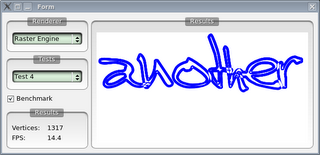
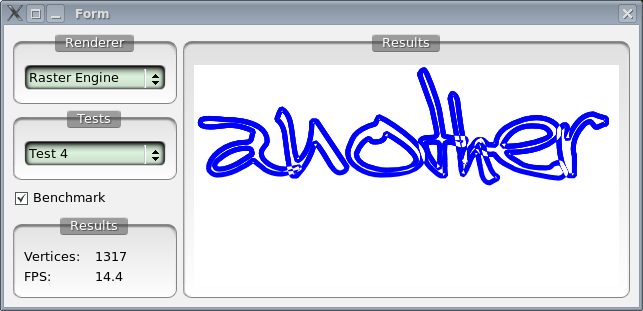
To test this method I wrote today an application to compare different methods of rendering complex polygons (full client side rasterization, trapezoidation on X11 with Xrender, triangulation with OpenGL and finally stencil tests with OpenGL). So far Ignacios stencil method is by far the best. A sample result showing rendering of a rather complex (1000+ vertices) polygon follows, first client side rasterization:
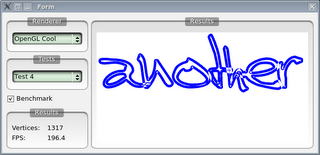
And now Ignacio's method:
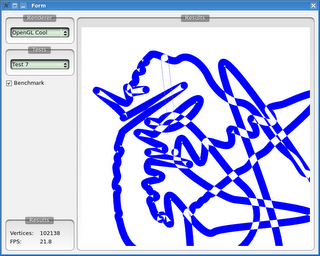
Finally an insane polygon I created for testing robustness (intersections at distances smaller than the resolution of doubles) and speed (it has segments with 100+ vertical vertices falling on a scanline). The new method can actually handle it correctly and with 100000+ vertices we still get usable performance. Pretty amazing, so thanks Ignacio for letting me know about this!
In general all (at least Open Source) hardware accelerated vector graphics frameworks break up complex polygons in the process of tessellation. Like I mentioned in a few blogs before this process turns out to be quite complicated when trying to make it robust and fast. Ignacio's method beautifully avoids both problems.
So now to the method - the core idea is that we render to the stencil buffer and use it to correctly render the final polygon. So to use the Odd-Even fill rule we enable stencil writes and set up the stencil mask with glStencilMask(0x01) call. Next we make sure that the on passing the pixels are inverted with glStencilOp(GL_KEEP, GL_KEEP, GL_INVERT);. Then we can set the function and reference value for stencil testing by calling glStencilFunc(GL_ALWAYS, 0, ~0). Now we just render the vertices of our complex polygons as, for example triangles (fans would be just as suitable). Finally, we can enable color writes, disable stencil writes and enable stencil test and render a quad with the min/max coordinates of our polygon.
The method is awesome, as it (in theory) doesn't involve any kind of client side computations (besides a trivial min/max test) and (again in theory) operates in whole on the hardware. A wonderful sideeffect of all of this is that we avoid robustness issues that tessellation introduces.
To test this method I wrote today an application to compare different methods of rendering complex polygons (full client side rasterization, trapezoidation on X11 with Xrender, triangulation with OpenGL and finally stencil tests with OpenGL). So far Ignacios stencil method is by far the best. A sample result showing rendering of a rather complex (1000+ vertices) polygon follows, first client side rasterization:
And now Ignacio's method:

Finally an insane polygon I created for testing robustness (intersections at distances smaller than the resolution of doubles) and speed (it has segments with 100+ vertical vertices falling on a scanline). The new method can actually handle it correctly and with 100000+ vertices we still get usable performance. Pretty amazing, so thanks Ignacio for letting me know about this!
Subscribe to:
Posts (Atom)